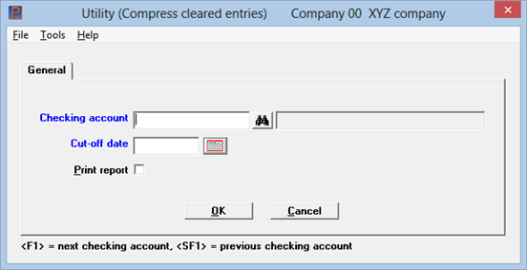
This chapter contains the following topics:
Compressing Entries into One Entry
The Compress cleared entries selection enables you to compress cleared entries and remove the details.
The only time entries can be removed (purged) from the Checkbook data is during start-up mode, from Control information.
During regular use, you can remove cleared entries using this selection.
When you compress, all cleared entries in one unbroken sequence are added together and made into one balance forward entry and then the original entries are deleted. Compression is a way of reducing the number of entries in the Checkbook.
After you compress your entries here, the payment and deposit details may still exists in Accounts Payable, Payroll and Accounts Receivable.
If you are in start-up mode from the Control information, you cannot run this selection. To exit start-up mode, refer to the Starting Up a Checkbook chapter in this documentation.
See a Compress Cleared Entries Report example in the Sample Reports appendix.
Select
Compress cleared entries from the Utility menu.
The following screen displays:
Graphical Mode
Character Mode
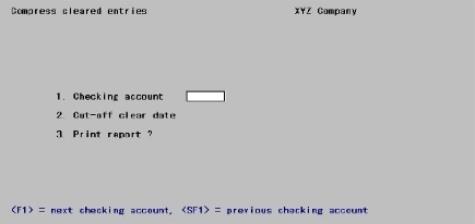
Enter the information as follows:
Options
Enter the checking account or use the option:
|
<F1> |
For the next checking account |
|
<SF1> |
For the previous checking account |
|
Example |
Press <F1> |
If a reconciliation is in progress this message displays:

Enter the cut-off date. Entries with clear dates on or before this date will be compressed.
You cannot compress entries that are part of an active reconciliation. If a reconciliation is in progress, you see a message telling you this, with the date of the current bank statement. You cannot enter a cut-off date on or later than this date.
|
Format |
MMDDYY |
|
Example |
Type 41519 |
Check the box or answer Y if you want to print a Compress Cleared Entries Report as the entries are being compressed; otherwise, press <Enter>.
This is your last opportunity to print checkbook entries as they currently exist. After the compression, the detail will be lost and the compressed entries will exist in summary (balance forward) form only.
|
Format |
Graphical: Check box where checked is yes and unchecked is no. The default is unchecked Character: 1 letter |
|
Example |
Check the box or type Y |
The program now looks through all entries in the checking account, compressing cleared entries with clear dates on or before the cut-off date into balance forward entries. In order to be compressed, entries must be in an unbroken sequence (at least two entries). Entries are compressed up to the point where the sequence is broken (an uncleared entry or an entry with a clear date after the cut-off date is encountered).
The cleared entries in that sequence are then deleted and a balance forward entry is created. The date of the balance forward record is the date of the last cleared entry in that sequence. The total of the balance forward entry is the sum of the cleared sequence.
The next unbroken sequence of cleared entries is then found and compressed into another balance forward entry.
If a void entry occurs in the middle of a sequence (group) of cleared entries that are being compressed, the void entry is deleted. Any void entry dated on or before the date of the last bank statement is also deleted.
The Compress Cleared Entries Report prints as entries are being compressed.